---
title: Setting Up a Custom Google Map in Bullseye with Snazzy Maps
description: Often we get the question from clients, “Can I customize the map to match my site?” And we say—NO PROBLEM! Sometimes the look of a standard Google Map doesn’t cut it for websites that need a more elegant or specialized look. It is actually very easy to customize the styles of the Google Map with …
image: https://blog.bullseyelocations.com/hubfs/Untitled-2.jpg
---
[Skip to content](https://blog.bullseyelocations.com/custom-google-map-in-bullseye#main-content)
[](https://www.bullseyelocations.com/)
[Why Bullseye?](https://www.bullseyelocations.com/why-bullseye)
Product
How we grow your sales
[ **Location Search** Help customers find the right place to buy your product](https://www.bullseyelocations.com/features-better-results) [ **SEO Local Pages** Generate highly qualified local search traffic](https://www.bullseyelocations.com/features-improve-customer-experience) [ **Lead Capture** Build dealer loyalty with qualified leads ready to buy your products](https://www.bullseyelocations.com/features-support-dealers) [ **Events and Promotions** Drive in-store traffic with local marketing](https://www.bullseyelocations.com/features-target-events-and-promotions) [ **Reporting and Analytics** Get meaningful data to inform marketing decisions](https://www.bullseyelocations.com/reporting-and-analytics) [ **Integrations** Connect your CRM, CMS, or other applications](https://www.bullseyelocations.com/integrations)
Industries
[ Manufacturing](https://www.bullseyelocations.com/manufacturing) [ Building Materials](https://www.bullseyelocations.com/building-materials) [ Retail](https://www.bullseyelocations.com/retail) [ Healthcare](https://www.bullseyelocations.com/healthcare) [ Insurance](https://www.bullseyelocations.com/insurance)
Resources
How to get the most from Bullseye
[**Knowledge Base** User guides to get Bullseye up and running quickly](https://kb.bullseyelocations.com/) [**API Documentation** Technical documentation for leveraging the Bullseye API](https://api.bullseyelocations.com/) [**Blog** Location marketing strategies, checklists, and best practices](https://www.bullseyelocations.com/blog) [**Video Guides** Step-by-step video walkthroughs to follow along with](https://www.bullseyelocations.com/video-guides) [**Case Studies** Explore Bullseye’s breadth of custom client solutions](https://www.bullseyelocations.com/casestudies) [**Custom Locators** Let Bullseye build the perfect locator for your needs](https://www.bullseyelocations.com/custom-locators)
[Enterprise](https://www.bullseyelocations.com/enterprise)
[Partners](https://www.bullseyelocations.com/partners/join-bullseye)
[Pricing](https://www.bullseyelocations.com/pricing)
[Login](https://app.bullseyelocations.com/) [Get a Free Trial](https://www.bullseyelocations.com/register/trialsignup?type=find)
# Setting Up a Custom Google Map in Bullseye with Snazzy Maps
[Developer Resources](https://blog.bullseyelocations.com/tag/developer-resources) By [Tom Flynn](https://blog.bullseyelocations.com/author/tflynn)
Often we get the question from clients, *“Can I customize the map to match my site?”* And we say—NO PROBLEM!
Sometimes the look of a standard Google Map doesn’t cut it for websites that need a more elegant or specialized look. It is actually very easy to customize the styles of the Google Map with a standard Bullseye interface. Just follow these quick and easy instructions to style and brand your classic store locator.
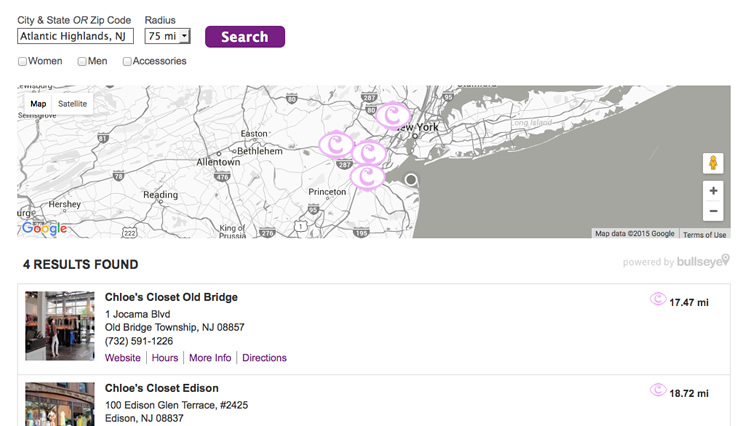
The following will demonstrate how to get a simple black and white custom Google Map with a standard Bullseye interface using code from [Snazzy Maps](https://snazzymaps.com).
### Copy and Paste the Code
Login to your [Bullseye Admin](https://app.bullseyelocations.com) and create an Interface. Once your interface is created, select Edit on the interface you wish to style.
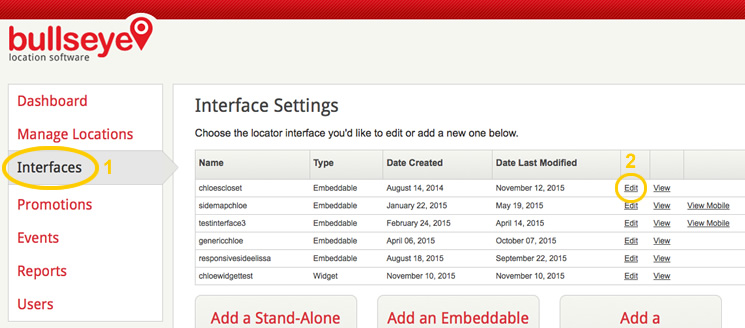
Then go to the Styles section and click on the Advanced tab. This is where you’ll add the javascript code to style the map in your search interface.
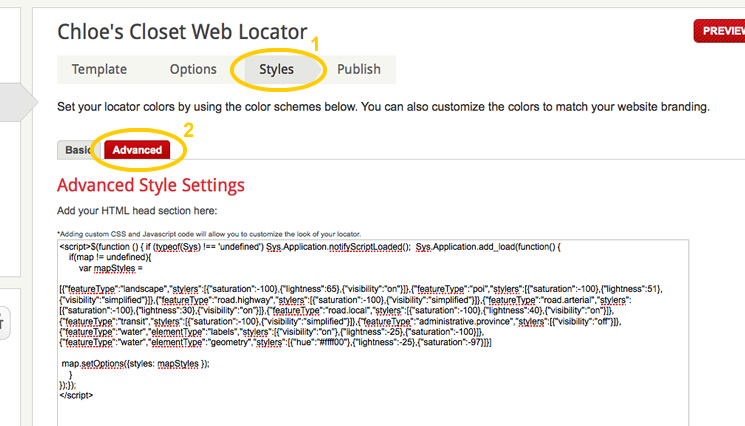
Copy all of the following base code into the Advanced Style Settings field:
``
Now, Save your interface.
### The Result
Here’s one example of a store locator with a black and white Google Map.
### Choose Any Style You Like
There are many more color schemes you can implement. Go to[https://snazzymaps.com/explore](https://snazzymaps.com/explore) and choose the style that works best for your website.
Be sure to replace the javascript style array with the one of your choice. To do this correctly, you need to replace the yellow highlighted portion of the code above with the new code you get from Snazzy Maps.
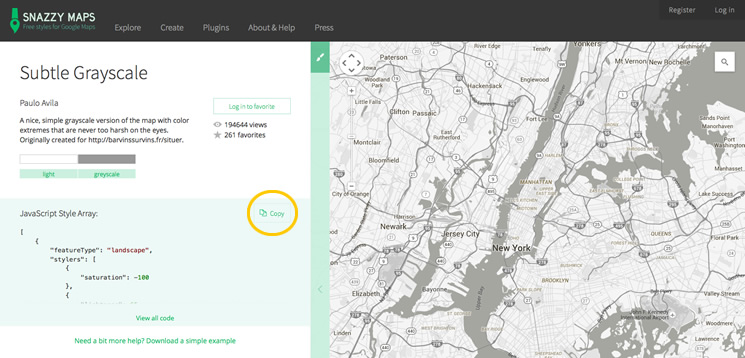
Save any changes you make, and you’re all setup!
The method for implementing Snazzy maps with our new Embeddable React Interface is a little different. For the new React interface, we can use the “googleMapStyle” variable in Advanced Style, and define it with our desired styles, like this:
`window.bullseyeLocationsConfig = { googleMapStyle: [ {featureType: 'landscape', stylers: [{ saturation: -100 }, { lightness: 65 }, { visibility: 'on' }],}, {featureType: 'poi', stylers: [ { saturation: -100 }, { lightness: 51 }, { visibility: 'simplified' },],}, {featureType: 'road.highway', stylers: [{ saturation: -100 }, { visibility: 'simplified' }],}, {featureType: 'road.arterial', stylers: [{ saturation: -100 }, { lightness: 30 }, { visibility: 'on' }],}, {featureType: 'road.local', stylers: [{ saturation: -100 }, { lightness: 40 }, { visibility: 'on' }],}, {featureType: 'transit', stylers: [{ saturation: -100 }, { visibility: 'simplified' }],}, {featureType: 'administrative.province', stylers: [{ visibility: 'off' }],}, {featureType: 'water', elementType: 'labels', stylers: [{ visibility: 'on' }, { lightness: -25 }, { saturation: -100 }],}, {featureType: 'water', elementType: 'geometry', stylers: [{ hue: '#ffff00' }, { lightness: -25 }, { saturation: -97 }],},],};`
Share this article
[mailto:?subject=Check%20%20%20%20%20%20%20%20%20out%20https://blog.bullseyelocations.com/custom-google-map-in-bullseye&utm_medium=social&utm_source=email%20&body=Check%20out%20https://blog.bullseyelocations.com/custom-google-map-in-bullseye&utm_medium=social&utm_source=email](mailto:?subject=Check%20%20%20%20%20%20%20%20%20out%20https://blog.bullseyelocations.com/custom-google-map-in-bullseye&utm_medium=social&utm_source=email%20&body=Check%20out%20https://blog.bullseyelocations.com/custom-google-map-in-bullseye&utm_medium=social&utm_source=email)
## Related Blog Posts
### [ Introducing New Mapping Features](https://blog.bullseyelocations.com/introducing-new-mapping-features)
### [ The Best Google Maps Store Locator Alternative](https://blog.bullseyelocations.com/google-maps-store-locator)
### [ 4 Local SEO Opportunities for Building Material Companies](https://blog.bullseyelocations.com/local-seo-for-building-material-companies)
[View All Posts](https://blog.bullseyelocations.com)
Bullseye
[Why Bullseye?](https://www.bullseyelocations.com/why-bullseye) [Pricing](https://www.bullseyelocations.com/pricing) [Enterprise](https://www.bullseyelocations.com/enterprise) [Location Search](https://www.bullseyelocations.com/features-better-results) [SEO Local Pages](https://www.bullseyelocations.com/features-improve-customer-experience) [Lead Capture](https://www.bullseyelocations.com/features-support-dealers) [Events and Promotions](https://www.bullseyelocations.com/features-target-events-and-promotions)
CMS/Integration
[WordPress](https://www.bullseyelocations.com/wordpress-solution) [IVR](https://www.bullseyelocations.com/ivr) [Store Locator Widget](https://www.bullseyelocations.com/store-locator-widget)
HELP
[Knowledge Base](https://kb.bullseyelocations.com/) [API Documentation](https://api.bullseyelocations.com/) [Blog](https://www.bullseyelocations.com/blog) [Video Guides](https://www.bullseyelocations.com/video-guides) [Case Studies](https://www.bullseyelocations.com/casestudies) [Custom Locators](https://www.bullseyelocations.com/custom-locators) [For Developers](https://www.bullseyelocations.com/for-developers) [For Agencies](https://www.bullseyelocations.com/for-agencies)
About Us
[About Bullseye](https://www.bullseyelocations.com/about-bullseye) [Team](https://www.bullseyelocations.com/company/team) [Partners](https://www.bullseyelocations.com/partners) [Media Center](https://www.bullseyelocations.com/media-center) [Privacy Policy](https://www.bullseyelocations.com/privacypolicy) [Terms of Use](https://www.bullseyelocations.com/register/terms) [Contact Us](https://www.bullseyelocations.com/contact-us)
CUSTOMER SUPPORT [1 (800) 606-1415](tel:+18006061415)
COPYRIGHT 2000-2026 BULLSEYE LOCATIONS
```json
{
"@context" : "https://schema.org",
"@type" : "BlogPosting",
"author" : {
"@type" : "Person",
"name" : "Tom Flynn",
"url" : "https://blog.bullseyelocations.com/author/tflynn"
},
"dateModified" : "2024-03-21T14:16:49.970Z",
"datePublished" : "2015-11-17T19:38:37.000Z",
"headline" : "Setting Up a Custom Google Map in Bullseye with Snazzy Maps",
"image" : [ "https://blog.bullseyelocations.com/hubfs/Untitled-2.jpg" ],
"mainEntityOfPage" : {
"@id" : "https://blog.bullseyelocations.com/custom-google-map-in-bullseye",
"@type" : "WebPage"
},
"publisher" : {
"@type" : "Organization",
"logo" : {
"@type" : "ImageObject",
"url" : "https://blog.bullseyelocations.com/hubfs/bullseye-logo-1.png"
},
"name" : "Bullseye Locations"
}
}
```